---
title: "Evidence Bot: Discord Case Management for Minecraft Staff"
description: "Set up Discord case management for Minecraft staff with Evidence Bot: forum threads per case, ticket IDs, status tags, notes, appeals and a workflow."
url: "https://www.zcraftstudios.com/blog/evidence-bot-discord-case-management-setup"
updated: "2026-11-12T03:39:11.005822+00:00"
source: "ZCraft Studios"
---
> Site index for AI agents: https://www.zcraftstudios.com/llms.txt (full reference: https://www.zcraftstudios.com/llms-full.txt). Every page is available as Markdown by adding `.md` to its URL or sending `Accept: text/markdown`.
1. [Home](https://www.zcraftstudios.com/)
2. [Blog](https://www.zcraftstudios.com/blog)
3. Evidence Bot: Discord Case Management for Minecraft Staff
[ All posts](https://www.zcraftstudios.com/blog)
# Evidence Bot: Discord Case Management for Minecraft Staff
ZCraft StudiosNov 12, 2026
Set up Discord case management for Minecraft staff with Evidence Bot: forum threads per case, ticket IDs, status tags, notes, appeals and a workflow.
## In this guide
- [The problem it solves](#the-problem-it-solves)
- [What Evidence Bot includes](#what-evidence-bot-includes)
- [Set it up](#set-it-up)
- [Design your case workflow](#design-your-case-workflow)
- [Evidence standards](#evidence-standards)
- [Connect it to your punishment plugin](#connect-it-to-your-punishment-plugin)
- [Handle appeals](#handle-appeals)
- [Privacy](#privacy)
- [Evidence Bot vs a ticket bot](#evidence-bot-vs-a-ticket-bot)
- [Frequently asked questions](#frequently-asked-questions)
- [Related reading](#related-reading)
**Quick answer:** Evidence Bot is a ZCraft Studios Discord bot that turns a **Discord Forum channel into a case system**. Each case gets its own forum thread with a **unique ticket ID**, **status tags** (open, under review, resolved, denied), **staff notes**, **evidence links** and **appeal tracking**. To set it up, create a Discord application and bot token, fill in the `.env` file, invite the bot, and run the setup command in your Forum channel.
_Disclosure: ZCraft Studios makes and sells Evidence Bot. Details come from the product page and its README, last checked November 2026\. Compare it with other ticket and case tools before choosing. See the [Best Moderation Tools Roundup](https://www.zcraftstudios.com/blog/best-minecraft-moderation-tools-plugins-2026)._
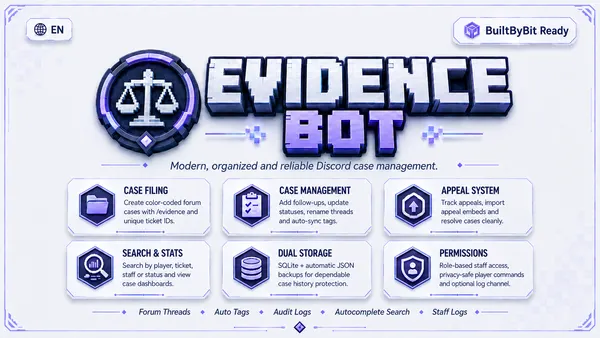
_The ZCraft Evidence Bot._
**[Get Evidence Bot](https://www.zcraftstudios.com/products/evidence-bot-discord-case-evidence)**
## The problem it solves
Punishment disputes and evidence tend to end up in DMs, random channels and screenshots that get lost. Staff then argue about what was said or shown, and appeals have no paper trail.
| Without a case system | With one |
| ----------------------------- | --------------------------------------- |
| Evidence scattered across DMs | One thread per case |
| No clear status | Status tags show where each case stands |
| Staff duplicate work | Notes and history are in the thread |
| Appeals start from scratch | Appeals are tied to the original case |
| Hard to see staff workload | Activity statistics |
It works alongside a punishment plugin, anti-cheat and logs. See [Staff Training Checklist](https://www.zcraftstudios.com/blog/minecraft-server-staff-onboarding) and [Ban Appeal Process](https://www.zcraftstudios.com/blog/minecraft-server-ban-appeal-process).
## What Evidence Bot includes
| Feature | Details |
| ------------------------ | ----------------------------------------------------------------------------- |
| Slash commands | 8 commands for staff case handling |
| Forum threads | Created automatically for each case |
| Ticket IDs | A unique ID per case |
| Status tags | Open, under review, resolved, denied |
| Staff notes and evidence | Notes and evidence links attached to the case |
| Appeals | Tracked against the original case |
| Statistics | Staff activity stats |
| Storage | SQLite with automatic JSON backups |
| Included | Full bot source, a .env.example and a README with setup and command reference |
| Runs as | A standalone Discord.js bot, with no Minecraft plugin needed |
The README lists the slash commands and how to use them.
## Set it up
1. **Create a Discord application** and a bot token in the Discord developer portal. Keep the token private.
2. **Configure `.env`** from the included `.env.example`.
3. **Invite the bot** to your server with the permissions the README lists.
4. **Create a Forum channel** for cases, and run the setup command in it.
5. **Test** by creating a practice case and adding a note, evidence and a status change.
You do not edit code to set it up, because it is configured through the `.env` file and slash commands.
### Where to run it
The bot has to stay online, so run it where it can be up all the time: a small VPS, a hosting panel that supports Node.js apps, or a spare machine. Use a process manager so it restarts after crashes. Keep backups of the SQLite file, and restrict access to the `.env`. See [Minecraft VPS Hosting Guide](https://www.zcraftstudios.com/blog/minecraft-vps-hosting-guide) and [Backup Strategy](https://www.zcraftstudios.com/blog/minecraft-server-backup-strategy).
## Design your case workflow
| Decision | Suggestion |
| ----------------------------- | ----------------------------------------------------- |
| Who can open cases | All staff, so evidence is never lost |
| Who can change status | Moderators and above |
| Who decides serious bans | A second reviewer |
| Who can see the Forum channel | Staff only, since it contains private evidence |
| How to name cases | Use the ticket ID plus the player name |
| When to close | After the punishment is applied or the case is denied |
### Use the status tags
| Tag | Meaning |
| ------------ | ----------------------------------- |
| Open | Report received, not reviewed |
| Under review | A staff member is checking evidence |
| Resolved | Action taken |
| Denied | No action, or an appeal was refused |
## Evidence standards
Decide what counts as evidence, and attach it to the case:
- Replay links. See [ReplayCore](https://www.zcraftstudios.com/blog/replaycore-minecraft-replay-plugin-anti-cheat-evidence).
- CoreProtect lookups. See [CoreProtect Rollback Guide](https://www.zcraftstudios.com/blog/coreprotect-rollback-commands-guide).
- Screenshots and chat logs with timestamps.
- Anti-cheat alerts. Never ban on a single alert. See [Best Anti-Cheat Plugins](https://www.zcraftstudios.com/blog/minecraft-anticheat-plugins-compared).
## Connect it to your punishment plugin
Evidence Bot tracks the case, and your punishment plugin applies the ban or mute. A simple routine:
1. Open a case and attach evidence.
2. Review and discuss in the thread.
3. Apply the punishment in game with a reason. See [AdvancedBan](https://www.zcraftstudios.com/blog/advancedban-setup-guide) or [LiteBans](https://www.zcraftstudios.com/blog/litebans-setup-guide).
4. Put the case ID in the punishment reason so it can be found later.
5. Set the status to resolved.
## Handle appeals
Link each appeal to the original case, so reviewers see the history. Assign a reviewer who was not involved, record the decision and tell the player. See [Ban Appeal Process](https://www.zcraftstudios.com/blog/minecraft-server-ban-appeal-process).
## Privacy
Case threads can hold private chat, IP details and personal information. Limit access to staff, delete cases you no longer need, and state in your rules that moderation records are kept. See [Server Rules Template](https://www.zcraftstudios.com/blog/minecraft-server-rules-template-examples).
## Evidence Bot vs a ticket bot
| Evidence Bot | A general ticket bot | |
| ------------ | ------------------------------------------ | ------------------------------------ |
| Purpose | Moderation cases and evidence | General support tickets |
| Structure | One forum thread per case with status tags | Usually a private channel per ticket |
| Appeals | Tied to the original case | Depends on the bot |
| Best for | Punishments and disputes | Help requests and applications |
Many servers use both. See [Discord Ticket Systems for Support](https://www.zcraftstudios.com/blog/minecraft-server-discord-ticket-workflow).
## Frequently asked questions
**What is Evidence Bot?** A Discord bot that turns a Forum channel into a moderation case system.
**Do I need a Minecraft plugin?** No, it runs entirely on Discord.
**Do I need coding experience?** No. You configure it with the included `.env` file and slash commands.
**Which database does it use?** SQLite, with automatic JSON backups.
**Can several staff use it at once?** Yes, case creation, notes and status updates are handled per thread.
**Does it include the source code?** Yes, with a README and an example `.env`.
## Related reading
- [Best Minecraft Moderation Tools and Plugins (2026)](https://www.zcraftstudios.com/blog/best-minecraft-moderation-tools-plugins-2026)
- [Minecraft Server Report System Setup](https://www.zcraftstudios.com/blog/minecraft-server-report-system-setup)
- [Top Discord Bots for Minecraft Communities](https://www.zcraftstudios.com/blog/top-discord-bots-minecraft-communities)
## Continue reading
- [ReplayCore: Minecraft Replay Plugin for Anti-Cheat Evidence](https://www.zcraftstudios.com/blog/replaycore-minecraft-replay-plugin-anti-cheat-evidence)
- [Minecraft Discord Account Linking: Security and Recovery](https://www.zcraftstudios.com/blog/minecraft-server-discord-linking-security)
- [Minecraft Join Spam and Bot Attacks: Defense Checklist](https://www.zcraftstudios.com/blog/minecraft-server-antibot-join-spam-defense)
- [Minecraft Staff Training Checklist: Permissions and Logs](https://www.zcraftstudios.com/blog/minecraft-server-staff-onboarding)
[ Previous guide Best Minecraft Moderation Tools and Plugins (2026)](https://www.zcraftstudios.com/blog/best-minecraft-moderation-tools-plugins-2026)[ Next guide How to Make a Minecraft Bedrock Server (BDS and Geyser)](https://www.zcraftstudios.com/blog/minecraft-bedrock-server-setup-bds-geyser)